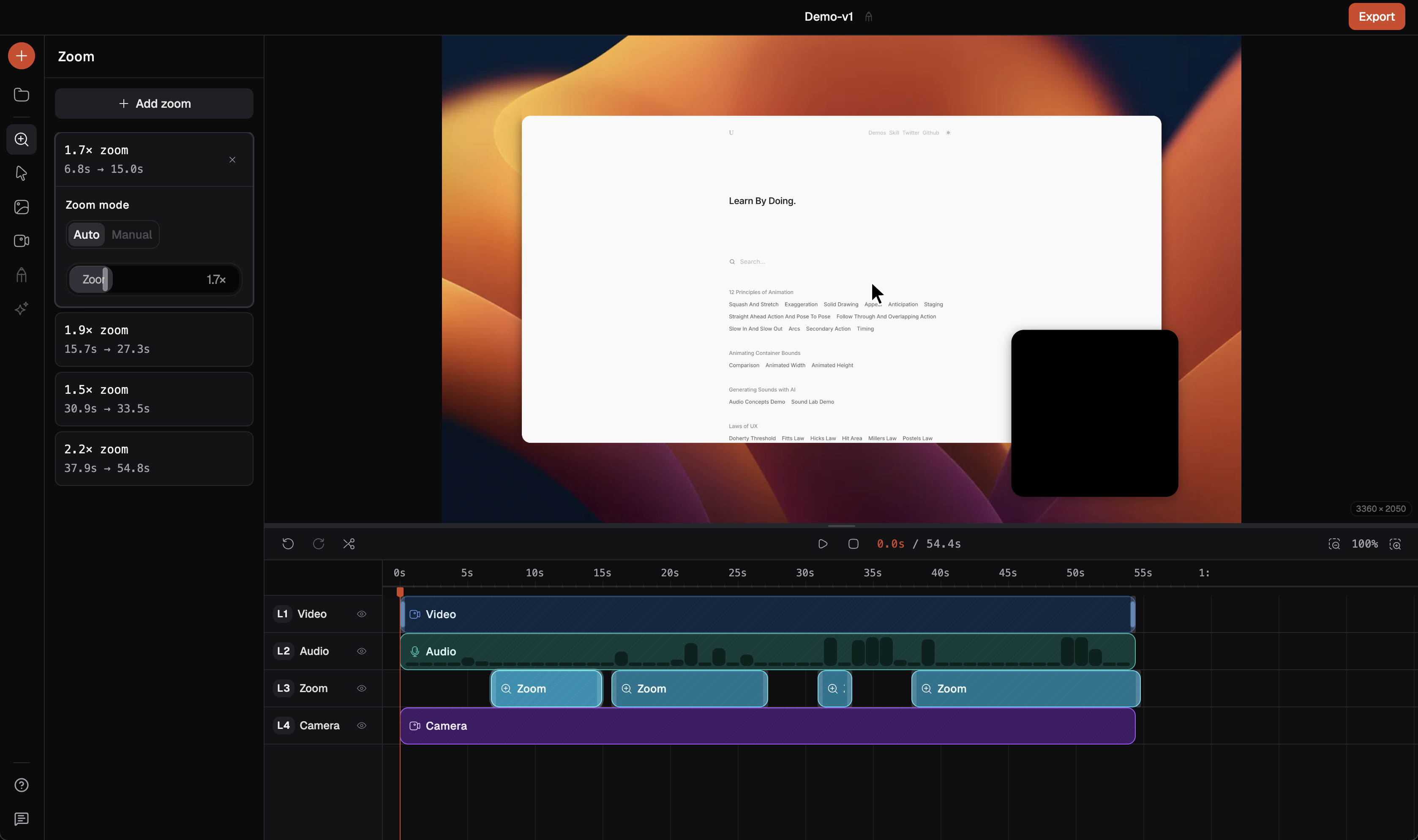
Automatic Zoom Detection
Screenforge analyzes cursor hotspots across your recording and adds zoom clips where attention should land.
Auto-zoom, cursor effects, and a timeline editor
All in one free app.
No watermark, no limits
Pro features, no paywall
Auto-zoom, cursor effects, background studio. Features other tools charge for, free in Screenforge.
A real editor, built in
Split clips, trim footage, and undo mistakes. No other app needed.
Auto-zoom that thinks for you
Screenforge detects where the action is and zooms in automatically.
Screenforge scans your cursor movement, finds where the action is densest, and places zoom clips automatically. No manual keyframing.
Automatic Zoom Detection
Screenforge analyzes cursor hotspots across your recording and adds zoom clips where attention should land.
1x to 4x Magnification
Set the exact scale for each moment. Close enough to read code, wide enough to show context.
Cursor-Following Mode
In Auto mode the zoom tracks your cursor as it moves. Your viewer stays locked on the action.
Cinematic Easing
Every zoom ramps up and down smoothly. Configurable ease-in and ease-out so nothing feels jarring.
Zoom on Its Own Track
Zoom clips live separately from your video. Move, resize, or delete any of them without touching the recording.
Replace the default system cursor with one that makes every click readable. Add ripples, motion blur, and the right size for your content.
Click Ripple Effects
A visual pulse radiates from every mouse click. Viewers always see exactly what you're pressing.
Cursor Sizing
Scale your cursor to match the context. Bigger for presentations, precise enough for detail work.
Motion Blur and Tilt
The cursor tilts and blurs as it accelerates. Looks intentional, not like a raw screen grab.
Idle Hiding
The cursor fades when you stop moving. Keeps the frame clean between actions.
Add a background, adjust the padding, round the corners. Your recording goes from desktop screenshot to product demo without touching a design tool.
Wallpapers and Solid Colors
7 wallpapers with more coming, plus any solid color you want. Clean backgrounds without the fuss.
Padding and Corner Radius
Frame the recording with breathing room and rounded corners. Looks like a product screenshot, not a screen grab.
Drop Shadow
One layer of depth that lifts the recording off the background. Adjustable blur and opacity.
Crop and Reframe
Drag 8-point handles to cut down to exactly what matters. Focus the viewer, lose the noise.
The features that complete the picture — recording, editing, exporting, all in one place.
Camera Overlay
Face cam that stays visible as content zooms. Position it anywhere, resize from the edges, shape it any way.
Timeline Editing
Split, trim, and rearrange clips on a real timeline. Every change is non-destructive. 100-step undo.
Microphone Recording
Pick your input device, watch the live level, and record clean audio from the first take.
No Watermark
Recordings export clean. No branding, no badge, no subscription needed to remove it.
Window & Region Capture
Record your full screen, a specific app window, or any region you drag to define.
Frame Rate Control
Record and export at 24, 30, or 60fps. Match the format to the content.
From developer demos to product walkthroughs — here's what people are saying.
The auto-zoom feature alone is worth switching. No more manually keyframing every clip just to keep viewers focused.
Alex K.
Senior Frontend Dev
The first recording I sent to a client looked genuinely professional. No watermark, clean export, no extra steps.
Priya S.
Product Manager
Made my first tutorial video in under an hour. The timeline editor is more capable than I expected.
Marcus T.
Developer Advocate
The cursor effects are the thing I didn't know I needed. My bug reports actually look professional now.
Sarah L.
QA Engineer
Local processing matters. I record sensitive internal workflows and the last thing I want is files uploading anywhere.
James W.
DevOps Engineer
Finally something that exports clean without a watermark. The background presets are a genuinely nice touch.
Nadia M.
UX Designer
Record, trim, add zoom effects, export. The whole thing happens in one place and I never have to leave.
Tom B.
Indie Developer
The click ripple effects are the small detail that makes demos feel polished. Our entire sales team switched.
Rachel A.
Solutions Engineer
The auto-zoom feature alone is worth switching. No more manually keyframing every clip just to keep viewers focused.
Alex K.
Senior Frontend Dev
The first recording I sent to a client looked genuinely professional. No watermark, clean export, no extra steps.
Priya S.
Product Manager
Made my first tutorial video in under an hour. The timeline editor is more capable than I expected.
Marcus T.
Developer Advocate
The cursor effects are the thing I didn't know I needed. My bug reports actually look professional now.
Sarah L.
QA Engineer
Local processing matters. I record sensitive internal workflows and the last thing I want is files uploading anywhere.
James W.
DevOps Engineer
Finally something that exports clean without a watermark. The background presets are a genuinely nice touch.
Nadia M.
UX Designer
Record, trim, add zoom effects, export. The whole thing happens in one place and I never have to leave.
Tom B.
Indie Developer
The click ripple effects are the small detail that makes demos feel polished. Our entire sales team switched.
Rachel A.
Solutions Engineer
Local processing matters. I record sensitive internal workflows and the last thing I want is files uploading anywhere.
James W.
DevOps Engineer
Finally something that exports clean without a watermark. The background presets are a genuinely nice touch.
Nadia M.
UX Designer
Record, trim, add zoom effects, export. The whole thing happens in one place and I never have to leave.
Tom B.
Indie Developer
The click ripple effects are the small detail that makes demos feel polished. Our entire sales team switched.
Rachel A.
Solutions Engineer
The auto-zoom feature alone is worth switching. No more manually keyframing every clip just to keep viewers focused.
Alex K.
Senior Frontend Dev
The first recording I sent to a client looked genuinely professional. No watermark, clean export, no extra steps.
Priya S.
Product Manager
Made my first tutorial video in under an hour. The timeline editor is more capable than I expected.
Marcus T.
Developer Advocate
The cursor effects are the thing I didn't know I needed. My bug reports actually look professional now.
Sarah L.
QA Engineer
Local processing matters. I record sensitive internal workflows and the last thing I want is files uploading anywhere.
James W.
DevOps Engineer
Finally something that exports clean without a watermark. The background presets are a genuinely nice touch.
Nadia M.
UX Designer
Record, trim, add zoom effects, export. The whole thing happens in one place and I never have to leave.
Tom B.
Indie Developer
The click ripple effects are the small detail that makes demos feel polished. Our entire sales team switched.
Rachel A.
Solutions Engineer
The auto-zoom feature alone is worth switching. No more manually keyframing every clip just to keep viewers focused.
Alex K.
Senior Frontend Dev
The first recording I sent to a client looked genuinely professional. No watermark, clean export, no extra steps.
Priya S.
Product Manager
Made my first tutorial video in under an hour. The timeline editor is more capable than I expected.
Marcus T.
Developer Advocate
The cursor effects are the thing I didn't know I needed. My bug reports actually look professional now.
Sarah L.
QA Engineer
Available now on macOS.
Windows
and Linux support coming very soon.
The features that most tools lock behind a paid plan: zoom animations, cursor effects, timeline editing, background customization. All free in Screenforge. We are building premium features too, but the core experience costs nothing.
Screenforge is available now on macOS. Windows and Linux support is coming very soon.
Yes. Add a camera overlay, position it anywhere on screen, and adjust its shape: square, horizontal, or vertical. It records as a separate track you can toggle on or off in the editor.
Yes. Microphone input with device selection and a live level indicator so you know your mic is working before you hit record.
No. Screenforge has a built-in timeline editor. Split, trim, and rearrange clips, add zoom effects, and undo everything. No other app needed.
Export to MP4, MOV, or WebM. You choose the format, frame rate (24/30/60 fps), and quality tier. Everything processes locally. No cloud upload required.
Start recording your screen in seconds.